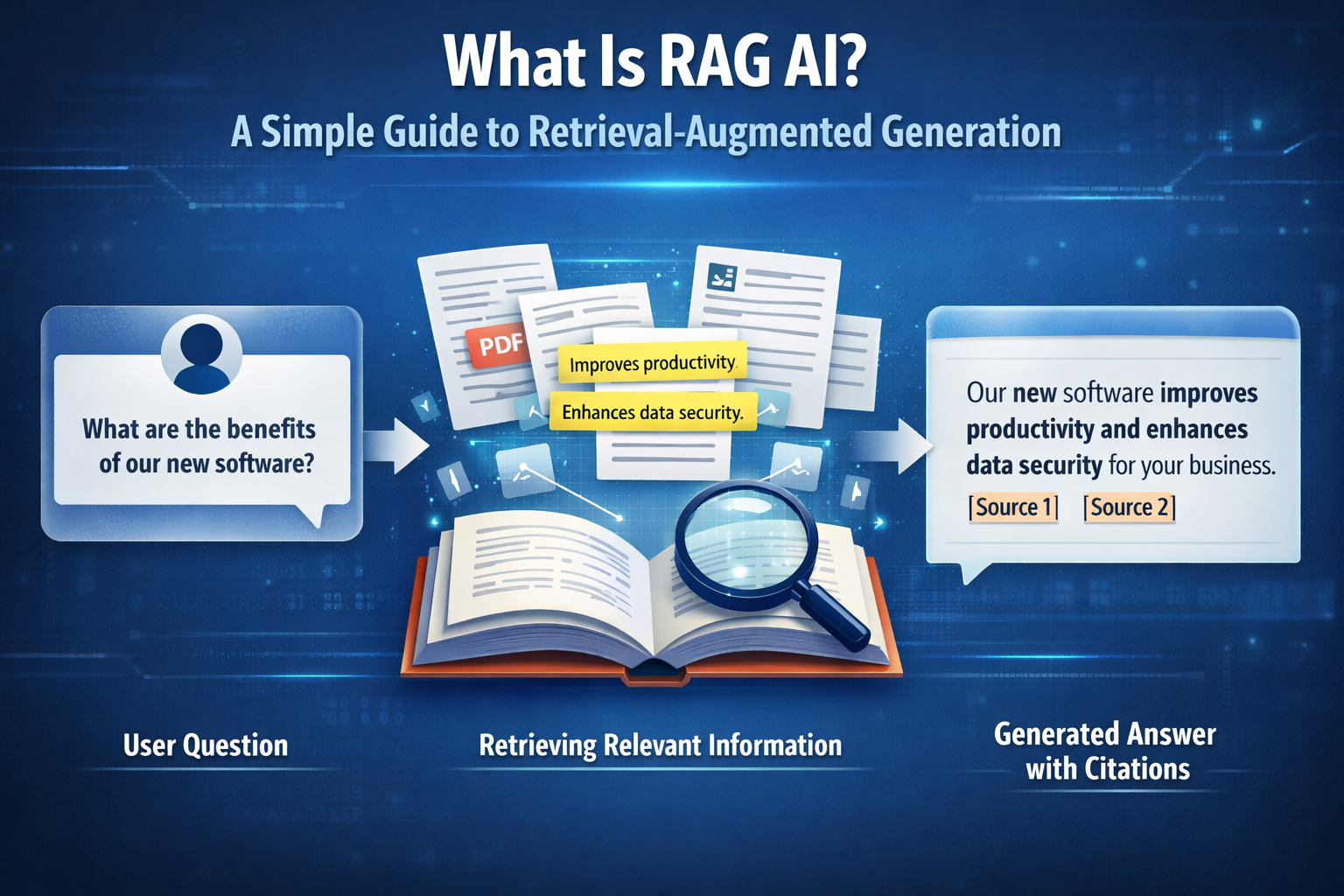
RAG AI. Short for Retrieval-Augmented Generation, is a method that lets AI answer questions using your own documents instead of relying on model memory. That means answers are more accurate, verifiable, and connected to real company knowledge. This guide explains what RAG AI is, how it works, and when it is the right choice for your team.
If you want to build an AI assistant for policies, SOPs, product documentation, onboarding content, or internal knowledge bases, RAG is usually the right starting point.
It matters because standard language models can sound fluent and confident while still being wrong. RAG improves that by retrieving evidence first and then generating an answer based on the retrieved context.
If you want the full practical version, read our complete guide to building a RAG from your documents.
Read the full RAG AI Guide (architecture, evaluation, limitations), start here: RAG AI Guide →
What is RAG AI
RAG stands for Retrieval-Augmented Generation.
It combines two things:
Retrieval: finding the most relevant information from your sources Generation: using a language model to write an answer based on that evidence
A simple way to think about it is this: instead of asking AI to answer from memory, you let it look at the right documents first and then answer like an open-book exam.
That makes a big difference in practice. Instead of producing answers based only on patterns learned during training, the assistant can ground its response in company documents, policies, technical references, or support content.
Why RAG matters in practice
Without retrieval, a language model can sound convincing while being wrong.
That becomes a problem fast in business settings where teams need answers based on real documents, current policies, and internal knowledge. Support teams, operations teams, onboarding workflows, and internal assistants all depend on accurate information, not plausible-sounding guesses.
RAG makes AI more useful because it helps answers stay connected to evidence.
That means:
- fewer hallucinations
- more reliable answers
- better traceability
- faster updates without retraining the model every time a document changes
If you want to see how this works in a real workflow, explore the Brainpack Product. Discover Brainpack Product →
How does RAG work?
A RAG system usually works in three steps.
1. Your documents become searchable
The system ingests your source material and prepares it for retrieval. That can include PDFs, SOPs, wikis, policies, product documentation, help center content, or internal notes.
Those documents are usually cleaned and split into smaller chunks so the system can retrieve the right piece of information when a question comes in.
2. The system retrieves relevant evidence
When a user asks a question, the system searches the indexed content and finds the most relevant chunks.
This often uses semantic search, and in stronger implementations it may combine semantic retrieval, keyword signals, and reranking.
The goal is simple: find the best evidence before the model starts writing.
3. The model answers using that context
The language model receives the retrieved evidence and generates an answer constrained by it.
In strong RAG systems, the assistant is instructed to rely on the retrieved context, cite sources, and admit when the evidence is missing.
That is what makes RAG more trustworthy than generic chat.
What makes RAG better than a standard chatbot?
A standard chatbot often answers from general model knowledge. That can be useful for broad questions, but it breaks down when the answer depends on your company’s own documents.
RAG changes that.
Instead of treating the model like a universal source of truth, it turns the model into a reasoning layer on top of your verified content.
In practice, that means the assistant can answer questions like:
- What does our onboarding policy say?
- Which product plan includes this feature?
- What is the latest process for support escalation?
- Where is this requirement documented?
That is why RAG is such a strong fit for internal assistants, knowledge workflows, and document-based AI systems.
Common examples of RAG in business
RAG is useful anywhere AI needs to answer from real knowledge instead of generic memory.
Common use cases include:
- internal support assistants
- onboarding assistants
- document-based customer support
- product knowledge assistants
- policy and compliance lookup
- operational knowledge systems
- research workflows based on trusted sources
If your team depends on documents to answer questions, RAG is usually the foundation.
RAG AI use cases by industry
Financial services: RAG systems answer compliance questions using regulatory documents, reducing manual review time and audit risk.
Healthcare: Clinical teams use RAG to query treatment protocols and patient records without retraining the model on sensitive data.
Manufacturing: Engineers query technical manuals and SOPs in natural language, reducing downtime from documentation searches.
Customer support: Support teams deploy RAG assistants grounded in product documentation, cutting resolution time and improving consistency.
Legal and compliance: RAG surfaces relevant contract clauses and regulatory requirements on demand, with full citations for audit trails.
RAG vs fine-tuning
RAG and fine-tuning solve different problems.
Use RAG when:
- your information changes often
- answers must be based on documents
- citations and traceability matter
- you need faster iteration without retraining
Use fine-tuning when:
- you need more consistent tone or formatting
- the task is narrow and stable
- behavior matters more than changing knowledge
The practical rule is simple: use RAG for truth and use prompts or fine-tuning for behavior and format.
If you want the full comparison, read our guide on RAG vs fine-tuning.
What should a good RAG system include?
A reliable RAG system is not just “upload docs and chat.”
It usually depends on:
- clean knowledge sources
- good chunking
- strong retrieval
- clear answer rules
- source citations
- routines for updating and maintaining the knowledge base
In other words, the quality of the output depends on the quality of the retrieval and the structure of the underlying knowledge. If you want to go deeper into the full workflow, read our guide to building a RAG from your documents.
What are the main limitations of RAG?
RAG improves reliability, but it does not remove the need for good knowledge management.
A RAG system can still fail if:
- the right documents are missing
- content is outdated
- chunking is weak
- retrieval quality is poor
- multiple conflicting versions of the truth exist
That is why governance matters. Reliable AI depends on reliable source material. The strongest implementations do not just add retrieval. They build a process for keeping knowledge structured, current, and usable over time.
How Brainpack relates to RAG
RAG is the foundation. Brainpack turns that foundation into something teams can actually operate.
Instead of stitching together a one-off assistant, Brainpack helps teams turn documents into reusable BrainPacks that support source-backed answers, structured knowledge, governance, and repeatable deployment. That makes it easier to move from “we tested an assistant” to “we have a usable document-based AI workflow.”
Build a RAG from your documents
RAG is not just a way to improve AI answers. It is the foundation for turning your documents into reliable, source-backed workflows your team can actually trust.
If you want to move from theory to implementation, start with the full guide, explore the product, review pricing, or build your RAG directly.